

Yourboat,anywhere
youare.
The GOAT Device plugs into the NMEA 2000 network, draws its power from the bus and sends your boat's data to the Easysea App. Batteries, tanks, depth, wind, position and anchor: on your phone at anchor and, with Plus, from anywhere in the world.
Free app. GOAT Device one-time purchase. Plus monthly subscription, cancel anytime.

Real readings from the development boat, a Lagoon 400 in the Canaries, September 2026. They are the ones in the videos and screenshots on this page.
GOAT Device
One box on the boat's network. Everything starts here.
 1
2
3
4
1
2
3
4
- 1NMEA 2000One connector: data and power from the bus, about 0.2 A.
- 2Wi-FiOwn hotspot for setup, then boat Wi-Fi, 4G or Starlink.
- 3USB, EthernetUpdate from a USB stick without internet, network cable if you prefer.
- 4Screw mountTwo flanges, one drop cable, solid green LED when ready.
The GOAT Device reads, computes and stores: alarms are born on board and reach your phone as a notification, even with the app closed. The phone is for seeing and deciding.
- ConnectionNMEA 2000 drop cable and T-connector. Raymarine SeaTalk NG networks with the adapter cable.
- PowerFrom the NMEA 2000 bus, about 0.2 A. No other wiring, no extra fuse.
- What it readsEverything on the network: GPS, sounder, wind, tanks, engine, batteries, AIS, autopilot, rudder. Read only: it writes nothing to the network.
- VictronWith Cerbo GX or Victron shunts the full electrical picture comes in through VRM credentials, encrypted.
- UpdatesBy itself, as soon as it is online. If anything goes wrong it rolls back. USB stick as a fallback.
- DataAbout 20 MB per day at anchor and 60 under way. Offshore mode drops to 10 MB per day, one update every 6 hours.
GOAT Device €469,00 once, Plus €4,99 a monthFree app. GOAT Device one-time purchase. Plus monthly subscription, cancel anytime.
How it connects
One tee on the backbone, one cable, a green LED.
- 1
Add a tee to the backbone
Just like any NMEA 2000 instrument. With Raymarine SeaTalk NG you use the adapter cable. No free tee or cable on board? Add the connection kit with the GOAT Device.
- 2
Plug the drop cable and mount the box
Two screws on the flanges, somewhere dry near the bus. The device powers up from the bus: wait for the solid green LED, it takes two or three minutes.
- 3
Open the app and run setup
Settings, GOAT Device, Set up new device. Your phone joins the device hotspot and you pick the boat Wi-Fi. Internet is needed the first time.
- 4
Data flows
A few minutes later the device has updated itself, sensors are recognised and the first voyage is recording. From Device management you save more Wi-Fi networks, reboot or reset.
One tee, one cable, a green LED.No free tee on board? Add the connection kit with the device, we ship everything together.
The data and what it is for
Know how the boat is doing, before you get there.
Every number in the app answers a concrete question. These are the readings from the General and Electrical pages, with the question each one answers.
Anchor Guard
Am I dragging? The device checks your position against the radius you set. If you leave it, the notification is sent from on board and your phone sounds loud, even with the screen off.
House battery
Can I stay out another day? State of charge, voltage, current in or out, estimated time to full or empty.
Solar and balance
Am I making more than I use? Power per MPPT controller, energy since sunrise, inverter and shore power.
Tanks
How much water is left? Water, diesel, waste: level and daily use, for every tank on the network.
Depth
Will the tide leave me dry? Depth below keel with the last hour's graph and a shallow water alarm at your threshold.
Wind
Is it building at anchor? True and apparent wind, gust over the last 30 minutes, and at the dock it tells you whether the wind pushes you onto or off the pontoon.
Position and voyages
Where is the boat now, and where has it been? GPS position, course, speed and voyages recorded automatically, with GPX, KML and video export.
Alerts
Will anyone tell me if something happens? Anchor, wind, battery, depth, bilge, engine, GPS: a bell on every card, your thresholds, a history of every alarm with when it fired and when it cleared.
Anchor Guard
The night at anchor, with someone watching.


Drop
Mark the anchor on the map, or let the app recognise the manoeuvre by itself. With the phone's or the boat's GPS. Nudge the point with the arrows in 1, 5 or 10 metre steps and confirm with Set.
Watch who is around you
The app suggests scope from depth and expected weather. The AIS radar shows nearby boats with distance and course; with neighbour watch you get a warning if one gets too close, and you can draw hazard lines around the anchorage.
If you drag, you know within a minute
The GOAT Device checks the position against the radius and sends the notification from on board. The phone turns red with the distance from the anchor and three buttons: widen the radius, silence on this phone, raise anchor.
Next morning, the night in writing
Every alarm stays in the history: when it fired, how long it lasted, when it cleared. In the Croatian tests a night with wind from 4 to 28 knots and a big swing passed with no false alarm.
Sleep easy from your next night at anchor.Anchor Guard runs on the device and rings your phone, even with the screen off.
Easysea App
On your phone, on board and away.
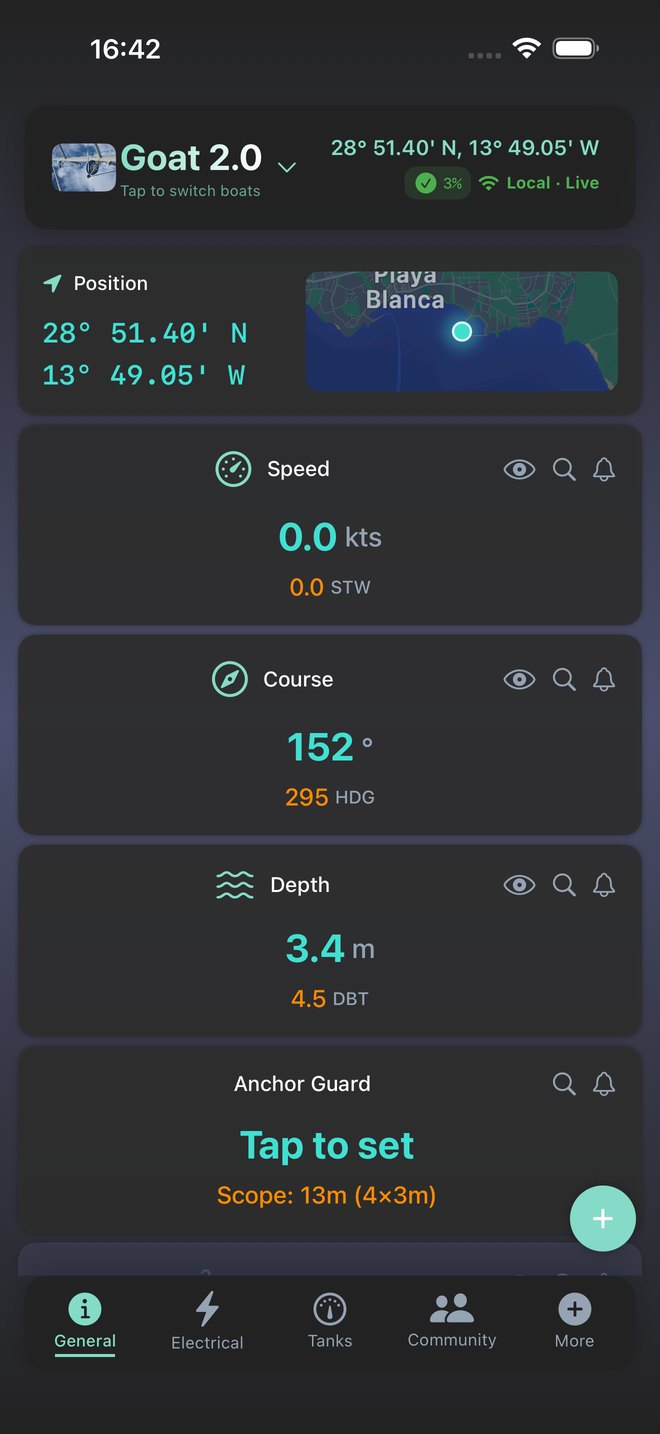
General
Position, speed, course, depth and the button to put the anchor under watch. With the plus button you sniff the NMEA network and add any sensor as a card.
Polar and coach
The app collects data while you sail, builds your boat's polar and the coach tells you whether you are doing well or should bear away. Real recording.

Wind at the dock
Tell the app which side you are moored on and it tells you whether the wind pushes you onto or off the dock. Useful at dinner ashore, to relax.
Under way
Weather read by your own boat, voyages that write themselves.
The storm alert downloads the GRIBs for your position and corrects them with what the onboard sensors actually measure: wind, pressure, temperature, roll. The result is a 24 hour forecast for your boat, not for the area.
Every outing becomes a voyage: track, miles, average speed, wind. Export it as GPX or KML, or turn it into a video with the animated route to share, like the one here.


Web dashboard
From home, in the browser, nothing to install.

General: position, depth, speed, course, wind, battery, anchor, leeway, autopilot, pressure.
The browser is for looking: live data, Anchor Guard and device setup live in the app. People following your boat from the public link see its position here.
Your boat's data, on your phone and in your browser.The app is free. Download it now and see the boats shared with you, the GOAT Device comes next.
What you buy
The device once. Plus every month.
- You pay today
- —
- Connection kit
- —
- Every month
- —
Launch prices. The first batch of GOAT Device is in production: leave your email and we will write when sales open.
The only recurring thing is Plus: it renews monthly on the payment method of your Easysea account and can be cancelled anytime from your account page. If you cancel you keep Plus until the end of the paid month, then go back to Free without losing boats, history or settings. The GOAT Device stays yours.
| With the GOAT Device | Free | Plus |
|---|---|---|
| Live data on board, over the boat Wi-Fi | ✓ | ✓ |
| Anchor Guard and core safety alarms | ✓ | ✓ |
| Map and voyage tracking | ✓ | ✓ |
| Tanks, electrical, navigation | ✓ | ✓ |
| Remote monitoring from anywhere | — | ✓ |
| Alert types | 5 | all 14 |
| Push alerts when away from the boat | — | ✓ |
| Boats on one account | 1 boat | up to 3 |
| Boat sharing | 3 guests | unlimited |
| Voyage history | 1 year | unlimited |
| Storm alerts and forecasts | — | ✓ |
| AIS radar and neighbour watch | — | ✓ |
| AI assistant and Marine Intelligence | — | ✓ |
| Performance polar and coach | — | ✓ |
Readings depend on the sensors present on the boat's NMEA 2000 network: without a wind instrument, for example, wind and polar stay empty.
From the beta test
Three months, seven boats, from the Baltic to the Canaries.
From July to September 2026 the GOAT Device ran on catamarans and monohulls in Croatia, Sweden, Sicily and the Canaries, with over thirty app releases built on the testers' feedback. The videos on this page come from there.
"A reliable remote anchor watch is probably the highest value feature: it is all about protecting the boat."
Beta tester, 14 m catamaran, Croatia"The winds went up from 4 to 28, with a big swing and no false alarm."
Beta tester, after a night at anchor"The amount of functionality is impressive."
Beta tester, monohull, SicilyComplete the system
More sensors on the network, more the app can see.
The GOAT Device reads everything on the NMEA 2000 bus. These are the products in the Easysea catalogue that add data to the app: each one unlocks a card, an alarm or a feature.
Electrical
 VICTRON Cerbo GX MK2 communication centerIn the dashboardMAIN BATTERY99%13.4 VINVERTERInverting162 W AC · 229 VSHORE POWERDisconnectedNot connectedWhat you get
- Battery card: voltage, current, state of charge
- Solar with daily and weekly charts
- Shore power alarm and hours-left forecast
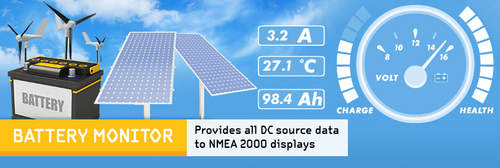 Yacht Devices Battery Monitor YDBM-02In the dashboardMAIN BATTERY99%13.4 VBATTERY FLOWCharging2.5 A inTIME TO FULLFullCharging (2.5 A)What you get
- Battery card from your shunt: voltage, current, state of charge
- Time to full and to empty
- Low battery alarm at your threshold
 Victron Energy SmartSolar MPPT 100/30In the dashboardSOLAR POWER442W32.1 A totalMPPT 1110W7.9 ASOLAR TODAY4.6kWhSince sunriseWhat you get
- One card per MPPT controller
- Solar today in kWh
- Balance: what you make, what you use
Weather and climate
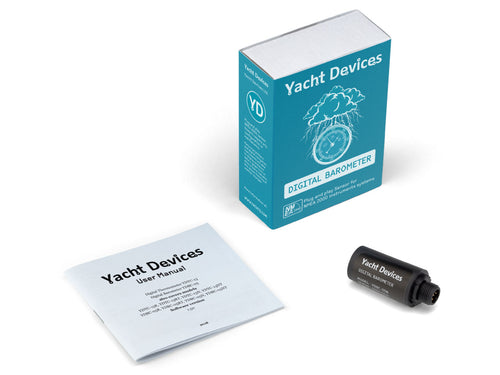 Yacht Devices Digital Barometer YDBC-05In the dashboardPRESSURE1018hPaBarometricSTORM ALERTOn24 h forecastWhat you get
- Storm alert: warning hours before the worst
- Pressure graph with trend
- Weather alarm at your threshold
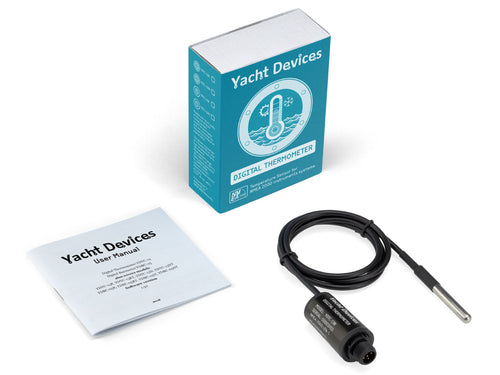 Yacht Devices Digital Thermometer YDTC-13In the dashboardAIR TEMPERATURE37.7°CCabinENGINE ROOM41°CEngine runningFRIDGE4°CNormalWhat you get
- One card per zone: cabin, engine, fridge
- Engine room overheat alarm
- Fridge or freezer failure warning
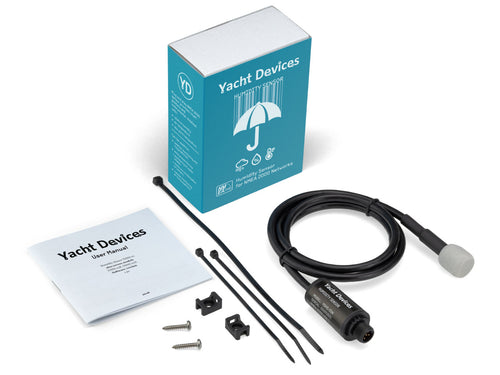 Yacht Devices Humidity Sensor YDHS-01In the dashboardHUMIDITY46%CabinDEW POINT24°CCondensation pointWhat you get
- Humidity and dew point card
- Condensation risk alarm
- Ventilation advice when needed
Tanks
 GOBIUS C NMEA 2000 external level sensorIn the dashboardFRESH WATER84%Tank 1USED TODAY38lYesterday 42 lWhat you get
- Level without drilling the tank
- Tank card in percent and low level alarm
- Daily use and history
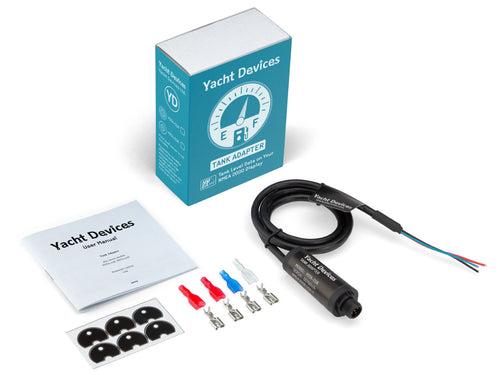 Yacht Devices Tank Adapter (1 tank) YDTA-01In the dashboardDIESEL100%Port tankLOW LEVELAlarmAt your thresholdWhat you get
- Your float sender joins the network
- Tank card and low level alarm
- Use per voyage
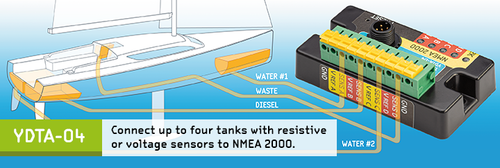 Yacht Devices Tank Adapter (4 tanks) YDTA-04In the dashboardFRESH WATER84%DIESEL PORT100%DIESEL STBD100%WASTE35%What you get
- Up to four tanks with one adapter
- One card and one alarm per tank
- Water, diesel and waste together
Engine
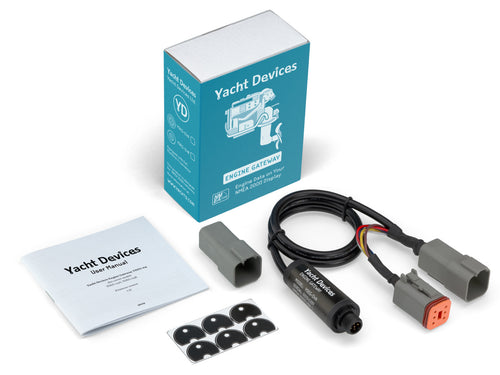 Yacht Devices Engine Gateway YDEG-04In the dashboardENGINE RPM1850rpmCruisingENGINE TEMP82°CNormalENGINE HOURS1240hTotalWhat you get
- Engine card: RPM, temperature, hours (Volvo, Yanmar, J1939)
- Engine temperature alarm
- Engine hours in the voyage log
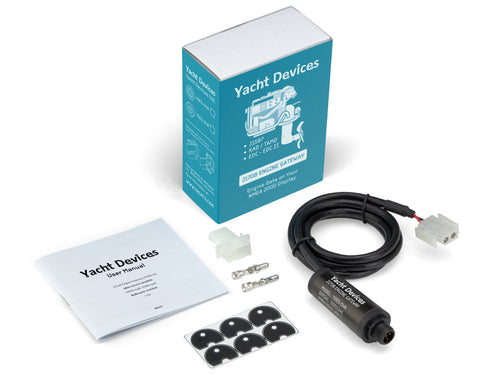 Yacht Devices J1708 Engine Gateway YDES-04In the dashboardENGINE RPM1650rpmCruisingOIL PRESSURE3.2barNormalENGINE HOURS4870hTotalWhat you get
- Same data from J1708 engines: Caterpillar, Cummins, Detroit
- Temperature and oil pressure alarm
- Engine hours in the voyage log
 Yacht Devices Outboard Gateway YDOG-01In the dashboardENGINE RPM3200rpmOutboardENGINE TEMP63°CNormalWhat you get
- Engine card for the outboard
- RPM, temperature and hours
- Temperature alarm
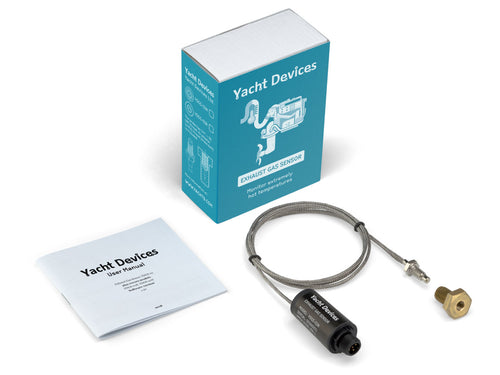 Yacht Devices Exhaust Gas Sensor YDGS-01In the dashboardEXHAUST TEMP210°CNormalALARM THRESHOLD300°CImpeller, seacockWhat you get
- Exhaust gas temperature in real time
- Alarm when cooling fails: impeller, seacock
- Trend over time to spot wear
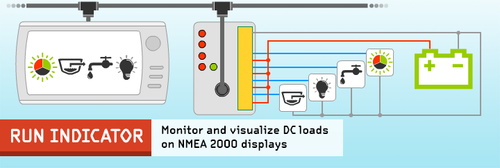 Yacht Devices NMEA 2000 Run Indicator YDRI-04In the dashboardENGINEOn1240 h totalGENERATOROff312 h totalWhat you get
- Engine hours and on or off state without a gateway
- Up to four loads: engine, generator, pumps
- Hours in the voyage log
Navigation
Yacht Devices NMEA 2000 Run Indicator YDRI-04In the dashboardRUDDER ANGLE+0°StarboardAUTOPILOTstandbyRudder +0°What you get- Rudder angle card
- See the helm at anchor and under way
- Your resistive sensor joins the network
Yacht Devices NMEA 2000 Run Indicator YDRI-04In the dashboardPOSITION28° 3.1 N14° 21.8 W · 20 satsWIND SPEED2.5kts TWS2.4 kts AWSAIS RADAROnTargets aroundWhat you get- Brings your existing NMEA 0183 GPS, AIS or wind onto the network
- They show in the app like any other instrument
- AIS radar without changing receiver
Connection
Yacht Devices NMEA 2000 Run Indicator YDRI-04In the dashboardDEPTH3.3mBelow keelCOURSE105°HDG 207°SPEED6.2ktsSOGWhat you get- Connects the GOAT Device to a SeaTalk NG network
- All Raymarine instruments in the Easysea App
- No extra converter
Yacht Devices NMEA 2000 Run Indicator YDRI-04In the dashboardSTATUSOnline11 min agoREMOTEOnFrom home and phoneWhat you get- Remote monitoring from anywhere
- Push alerts when you are away
- Updates and sync always on
Tiles are examples of how data shows up in the app. Wind, sounder, AIS and chartplotter come from the instruments you already have: anything that speaks NMEA 2000 ends up in the app. Wi-Fi, USB or Ethernet gateways are not needed: the GOAT Device does that. For a complete set write to support@easysea.org.
First the GOAT Device, then the sensors.Everything already on your NMEA 2000 network shows up in the app from day one.
Compatibility
What you need on board.
- NMEA 2000An NMEA 2000 network with at least one GPS source switched on: plotter, VHF or satellite compass. The GOAT Device plugs into the backbone with a standard drop cable.
- SeaTalk NGRaymarine SeaTalk NG networks connect with the SeaTalk NG to NMEA 2000 adapter cable. SeaTalk 1 needs a converter.
- VictronCerbo GX, SmartShunt and MPPT controllers through VRM credentials, encrypted. Multiple battery banks too, each with its own name.
- Internet on boardRemote access needs boat Wi-Fi with internet: 4G or 5G router, Starlink, marina Wi-Fi. The device remembers several networks and switches to the one available. Without internet it works in Direct Connect and the app joins its hotspot.
- Phone and browseriPhone with iOS 17 or later, Android, and the web dashboard. Device setup happens on the phone.
- Works alongsideOrca Core, PredictWind DataHub, Garmin, B&G and Raymarine plotters: the GOAT Device only reads, it writes nothing to the network.
Questions before you order.
Do I need a GOAT Device to use the app?
The app is free and you can sign in without a device. To read your own boat you need a GOAT Device on board: it connects to the NMEA 2000 network and sends the data to your account. Boats shared with you by their owner show up without a device.
Do I need internet to set up the device?
Your phone connects to the device hotspot directly, but the first setup needs internet on the boat Wi-Fi so the device can register. After that it also works in Direct Connect, without internet, for local data.
What happens if I cancel Plus?
You keep Plus until the end of the period you paid for, then the account goes back to Free. Boats, history and settings stay. Anchor Guard and core alarms keep working.
Does the boat need to stay switched on?
The GOAT Device is powered by the NMEA 2000 bus, so the network must stay on, including one GPS source. That is what a boat left in a marina usually keeps on anyway.
Can I use it on more than one boat?
Yes. One GOAT Device per boat, up to 3 boats with Plus. You switch boat from the app.
Can I share my boat?
Yes. Invite crew or family by email: they see the boat data in read-only mode. Free shares with 3 guests, Plus without limits. A public link lets anyone with a free account follow your position.
What if I replace the device?
Set up the new device and it takes over the boat: history and settings stay with your account.
Download Easysea App. It is free.
Sign in, look at the boats shared with you, and when the GOAT Device arrives set it up in an afternoon.
Summer Sale · August 15 → 31
Summer Sale.
Summer Sale prices across the whole catalogue. Discount already applied, no code to enter. On September 1 everything goes back to list price, automatically.
Black MonthBlack WeekBlack FridayCyber Monday · November 1 → 22November 23 → 26November 27 → 29November 30
BlackBlackBlackCyber Month.Week.Friday.Monday.
Discount already applied, no code to enter. Black Month prices until November 22.Black Week prices until November 26.Black Friday prices until November 29.On December 1 everything goes back to list price, automatically.